Claude Code MCP Servers: Setup, Security and Team Controls
Claude Code MCP servers explained: how to add one, where configuration lives (local, project, user), the allowlist and permission controls a team needs, and a checklist and short policy to copy for UK regulated firms.
This page explains how Claude Code MCP servers work: how to add one, where the configuration lives, and the controls a team needs before an MCP server touches customer data or production systems.
It is written for engineering leads and for the risk or compliance people who have to sign off their tooling, with UK regulated firms in mind. All Claude Code behaviour below was checked against Anthropic's documentation on 2 November 2026. Claude Code changes often, so check the version you run.
Jump to the checklist and policy to copy ↓
What Claude Code MCP servers are
The Model Context Protocol (MCP) is an open standard that gives an AI app a common way to discover tools and call them. An MCP server exposes the tools for one system: GitHub, Jira, Slack, a database. Add one to Claude Code and the model can call those tools during a coding session.
That is where the risk comes from. A server runs with real credentials, and the model chooses the tool and writes the arguments based on whatever is in its context, including text it has just read from a ticket or a web page. Anthropic's documentation says to verify you trust each server before connecting it, and warns that servers fetching external content can expose you to prompt injection.
There are two kinds of server:
- Remote (HTTP). Runs elsewhere. You connect to a URL and usually sign in with OAuth. This is the transport Anthropic recommends for remote servers.
- Local (stdio). A program Claude Code starts on your machine, with your user's permissions.
How to add an MCP server to Claude Code
Use claude mcp add. For a remote server:
claude mcp add --transport http notion https://mcp.notion.com/mcpThen start Claude Code, run /mcp and sign in if the server uses OAuth. For a local server, everything after the double dash is the command that starts it:
claude mcp add --transport stdio my-server -- npx -y some-package@1.2.3The commands you will use most:
claude mcp listshows every configured server and its status.claude mcp get <name>shows one server's details.claude mcp remove <name>removes it and deletes the OAuth tokens Claude Code stored. Anthropic's documentation doesn't say this revokes them at the provider, so first use Clear authentication in/mcp, then confirm the grant is gone at the provider./mcpinside a session shows status, handles sign-in and turns a server off without deleting it.
Where Claude Code MCP configuration lives
Claude Code MCP configuration is stored at one of three scopes, set with --scope. Local is the default.
| Scope | Loads in | Shared with the team? | Stored in |
|---|---|---|---|
| Local | The current project only | No | ~/.claude.json |
| Project | The current project only | Yes, through version control | .mcp.json in the project root |
| User | All your projects | No | ~/.claude.json |
If the same server is defined twice, local beats project, and project beats user. Plugin servers and claude.ai connectors rank below those. The whole entry from the winning scope is used; fields are not merged.
What this means for a team: two of the three scopes sit in one file in each person's home directory, so no one can see them centrally. The third travels with the repository to every laptop that clones it. An inventory has to cover all of them.
Project servers need approval, except when they don't
In an interactive session, Claude Code asks before using a server from .mcp.json. A cloned repository cannot approve its own servers: approvals committed to its .claude/settings.json are ignored until you trust the folder.
There is one exception to plan for. In claude -p runs, Agent SDK sessions and some cloud sessions, nobody is there to answer the prompt, and Claude Code loads project-scoped servers without asking. So a CI job that runs Claude Code on a pull request can pick up whatever a .mcp.json in that branch names. To keep a server out, add it to disabledMcpjsonServers, or start the run with --strict-mcp-config and pass only the servers you want with --mcp-config.
The controls Claude Code gives you
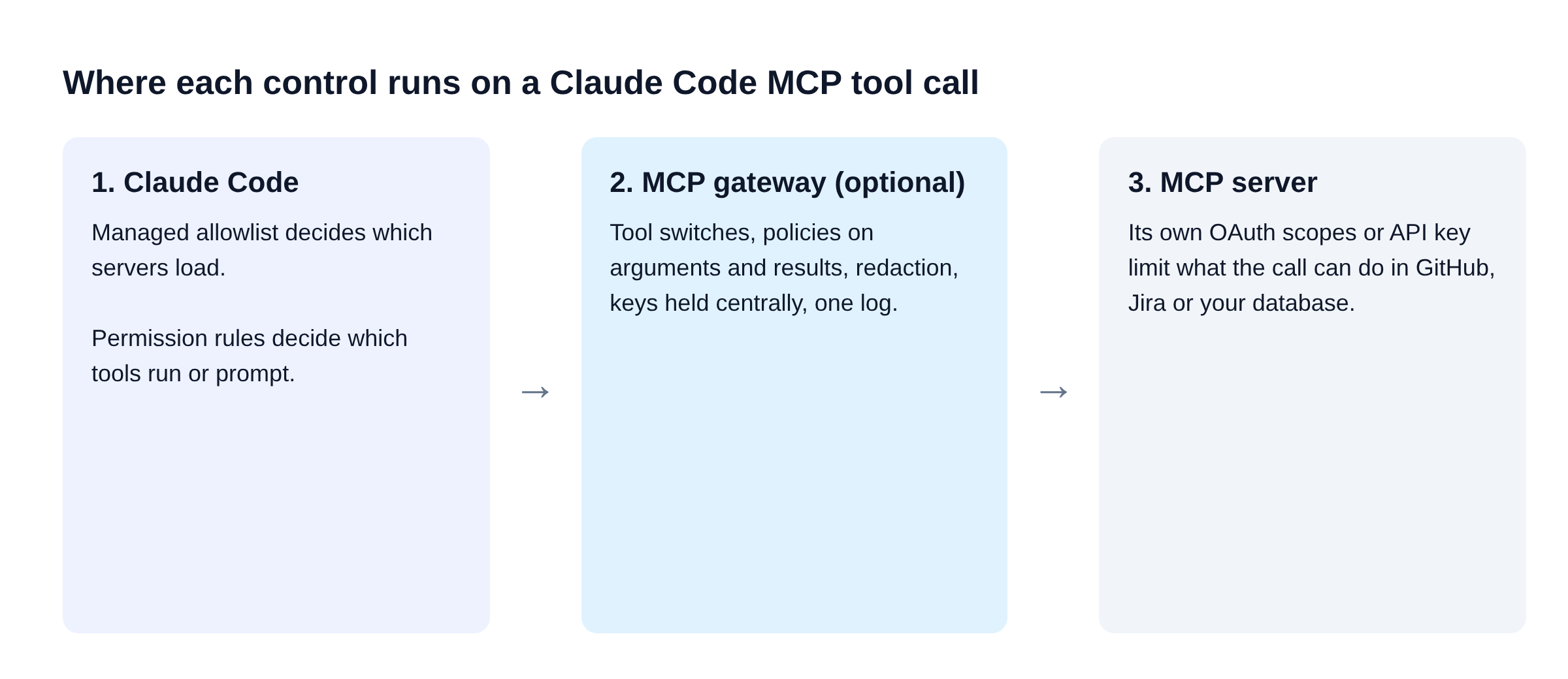
Claude Code has controls at two levels: what each person sets, and what an administrator enforces.
Permission rules for MCP tools
By default, Claude Code prompts on first use of each tool. Permission rules in settings.json change that per tool. MCP tools are named mcp__<server>__<tool>:
{
  "permissions": {
    "allow": ["mcp__github__get_*"],
    "ask": ["mcp__github__create_*"],
    "deny": ["mcp__github__delete_*", "mcp__github__merge_*"]
  }
}
Rules are checked in the order deny, ask, allow, and the first match decides. An allow rule cannot carve an exception out of a deny rule. Claude Code enforces these rules itself, not the model, so they are real controls. An instruction in CLAUDE.md is not.
Two limits. A wildcard only works if the server's tool names follow that pattern, so check the real names when you review the server. And in a settings file, Claude Code skips any mcp__ rule with parentheses, so you cannot match on a tool's arguments there; that takes a deny rule passed with --disallowedTools.
Managed controls for a whole team
User settings can be changed by the user. To enforce anything, an administrator uses a managed source: server-managed settings, a device-management profile, a registry policy or a managed-settings.json file. Anthropic's managed MCP documentation describes these patterns:
| Pattern | What it does | Configure with |
|---|---|---|
| Disable MCP | No servers load, except the few that load under exclusive control | managed-mcp.json with an empty server map |
| Fixed deployment | Everyone gets the same servers and cannot add others | managed-mcp.json with your servers |
| Provided servers | Everyone gets your remote servers and keeps their own | managedMcpServers |
| Approved catalogue | People add servers from your list; anything else is blocked | allowedMcpServers with allowManagedMcpServersOnly: true |
| Soft allowlist | An allowlist that users can broaden in their own settings | allowedMcpServers alone |
| Denylist only | Blocks named servers, allows everything else | deniedMcpServers |
For most regulated teams the approved catalogue is the right starting point. This managed settings file allows only the servers you list, and ignores any allowlist in user or project settings:
{
  "allowManagedMcpServersOnly": true,
  "allowedMcpServers": [
    { "serverUrl": "https://api.githubcopilot.com/*" },
    { "serverUrl": "https://*.internal.example.com/*" }
  ]
}
Four details catch people out:
- Leave out
allowManagedMcpServersOnlyand the list is advisory. Allowlists from every scope merge, so a user can broaden yours in their own settings. - Don't rely on
serverNameentries. The name is a label the user chooses, so anyone can call any server "github". Anthropic says plainly that it is not a security control. Match onserverUrlfor remote servers andserverCommandfor local ones. - Unset is not the same as empty. An unset
allowedMcpServersallows every server. An empty array blocks them, apart from the groups that skip the check. - Some servers skip the allowlist. Built-in servers such as the IDE server do, and so do servers you deliver yourself through
managedMcpServers. The denylist still applies to them.
managed-mcp.json sits at a system path (/Library/Application Support/ClaudeCode/ on macOS, /etc/claude-code/ on Linux and WSL, C:\Program Files\ClaudeCode\ on Windows) and is deployed with administrator rights, usually through device management. It can't be delivered through server-managed settings. Any user on the machine can read it, so keep credentials out of it.
Credentials
The quick way to get a server working is a live token in a header or an env block. Anything in .mcp.json gets committed. Instead, reference a variable, because Claude Code expands ${VAR} in that file, or better, use OAuth so each person signs in as themselves. A shared key cannot be attributed to a person or revoked for one leaver.
Monitoring
Claude Code can export OpenTelemetry data. Set CLAUDE_CODE_ENABLE_TELEMETRY=1, and add OTEL_LOG_TOOL_DETAILS=1 to include real MCP server and tool names and tool inputs, which are hidden by default. Both are off unless you turn them on, and you need a collector to send the data to and a person to read it.
What those controls don't do
Claude Code's own controls decide which servers load and which tools can run. They leave four gaps that a security review will find:
- Personal data in results. A customer lookup returns phone numbers and dates of birth as well as the status you wanted. All of it goes to the model. Nothing in the controls above removes it first.
- A record you can show someone. Permission rules leave no central log. Telemetry can give you one, but you have to build the pipeline, and tool output is only captured with extra settings. A transcript on a laptop is not an AI audit trail.
- Tool lists change. A server can add or rename tools while connected. In an interactive session Claude Code simply fetches the new list. The server you reviewed with twelve tools can expose fifteen tomorrow. A deny rule won't catch a name you didn't predict.
- Other AI apps. These settings apply to Claude Code. The same people may use Cursor, Copilot or ChatGPT, each with its own servers, keys and history.
The usual way to close these is an MCP gateway: one MCP server in front of the real ones, which holds the credentials and checks and logs every call. It works alongside the allowlist rather than replacing it: allow only the gateway's URL, and other user-added MCP servers stop loading. The wider set of controls is in MCP security best practices.
What a UK regulated firm needs to be able to show
There is no FCA rule about Claude Code. The FCA says: "We do not plan to introduce extra regulations for AI. Instead, we'll rely on existing frameworks." Three of those matter here:
- Accountability. The same FCA page says its rules emphasise accountability for senior managers and are relevant to the safe use of AI, and points to SM&CR. If an engineering team's AI tools can reach production or customer data, a named senior manager should be able to show the steps taken.
- Records. SYSC 9.1.1R requires a firm to keep orderly records of its business and internal organisation, sufficient for the FCA to monitor compliance (common platform firms have the parallel rule in SYSC 9.1.1AR). Whether a given AI tool call falls within that is for your compliance team, but "we can't say what it did" is a poor position.
- Incidents. From 18 March 2027 the FCA's operational incident reporting rules set short deadlines. If an AI tool is involved, you need to reconstruct what happened quickly.
Customers ask the same questions. The AI questions in CAIQ and SIG questionnaires ask which tools an AI system can use, who approved them and whether each action is recorded.
MCP server checklist to copy
Work through this before Claude Code MCP servers reach anything sensitive.
Inventory
- List servers per person (
claude mcp list) and search repositories for.mcp.json. - Record each server's owner, who runs it, what system it reaches and whether it is read-only.
Approval
- Name who approves a new server, and what they check: publisher, version, credentials, tools.
- Deploy the approved list with
allowedMcpServersandallowManagedMcpServersOnly: true. - Match on
serverUrlandserverCommand, neverserverNamealone.
Least privilege
- Deny write, delete and merge tools you don't need; ask for those you do.
- Give each server a token scoped to one project or repository, not an admin key.
- Pin local server versions; never run
npx -y packagewithout a version.
Automation
- Review every
claude -pand CI use. Use--strict-mcp-configso a branch can't add a server. - Don't run with permission prompts bypassed on a machine that has production credentials.
Credentials
- No live tokens in
.mcp.jsonormanaged-mcp.json. Prefer OAuth, per person. - Add MCP access to your leavers process, including revoking grants at the provider.
Evidence
- Keep one record of each tool call: user, app, tool, arguments, result, outcome.
- Redact personal data before the model sees it.
- Review new or changed tools on a set schedule.
A short MCP policy to copy
Paste this into your engineering standards or your AI policy, and fill in the names.
MCP servers in coding tools. Only servers on the approved list may be used with [Claude Code / other tools]. [Role] owns the list and approves additions after checking the publisher, the credentials used and the tools exposed. Servers connect with individual, least-privilege credentials; no credential may be stored in a repository. Tools that write to production or delete data are denied unless [role] has approved them for a named purpose. Automated runs use a fixed server list. Every tool call that reaches company systems is logged and the record is kept for [period]. The list and the tools on it are reviewed [quarterly]. [Role], accountable to [senior manager], reports exceptions to [forum].
Common mistakes
- A soft allowlist mistaken for a hard one. Without
allowManagedMcpServersOnly, users can add to it. - Allowing by server name. Anyone can name a server "github".
- Forgetting CI. The interactive approval prompt doesn't exist in a
claude -prun. - Reviewing a server once. Its tool list can change after the review.
- A read-only server next to a send-email server. Each is harmless alone; together they are a route for data to leave.
- Treating
CLAUDE.mdas a control. It shapes what the model tries, not what Claude Code allows.
How ContextGate helps
ContextGate is an MCP gateway: one connection for Claude Code, Cursor, Copilot, ChatGPT and other MCP apps. Add it to Claude Code with one command:
claude mcp add --transport http contextgate https://api.contextgate.ai/mcpThen your MCP tool calls go through one place:
- Tool switches. Switch off any tool on a connection. It is hidden from your AI apps and refused if called. In approval mode, new tools arrive switched off.
- Policies on every call. Policies can block, warn or log. A plain-English check such as "block deleting a repository or force-pushing to main" runs before the tool does.
- Redaction. Personal data in results, including UK sort codes and National Insurance numbers, is replaced with placeholders before the AI app sees it.
- Secrets. A call with an API key in its arguments is blocked, and the key is kept out of the log. Keys for the apps behind it are held in the workspace, not on laptops.
- An activity log. Each call is recorded with the AI app, user, tool, arguments, redacted result and policy outcome. The AI security review pack and SM&CR pack are built from that record.
What it does not cover: ContextGate sees the tool calls that go through it. It does not see Claude Code's built-in tools, such as its own file edits and terminal commands, or your chats, so a command run through the shell stays outside it. Inventorying servers on each machine and vetting local servers remain your job, and you still decide the policies. For the wider picture, see AI agent governance.
Create a free workspace and put your first Claude Code MCP servers behind it. No card required.
Questions people ask
How do I add an MCP server to Claude Code?
Run claude mcp add --transport http <name> <url> for a remote server, then run /mcp in Claude Code to sign in. For a local server, run claude mcp add --transport stdio <name> -- <command>. Add --scope project to share it through the repository.
Where is the Claude Code MCP configuration stored?
Local and user servers are in ~/.claude.json. Project servers are in .mcp.json in the project root. Managed ones are in managed-mcp.json at a system path or in managed settings.
What are the best MCP servers for Claude Code?
The ones that reach systems your team already works in, such as source control, tickets and docs, from a publisher you trust, with the narrowest token that works. Browse the MCP servers list to see what exists. For a regulated team, who runs the server and what it can write matter more than a ranking.
Are Claude Code MCP servers safe?
Not by default. A local server is code running with your permissions, and a remote server holds whatever access you give it. Either can feed the model text that steers its next action. Vet the server, limit its tools and keep a record of what it did.
Can an administrator stop people adding MCP servers to Claude Code?
Yes. Deploy managed-mcp.json for a fixed set, or use allowedMcpServers with allowManagedMcpServersOnly: true for an approved list. To turn MCP off, deploy managed-mcp.json with an empty mcpServers map.
Does the same setup work for Slack, Atlassian and Figma MCP servers?
Yes. They are added the same way and follow the same scopes and permission rules. Check each provider's own setup page for its URL and sign-in steps, then apply the checklist above, because a chat or ticket server is also a source of untrusted text.
A summary, not legal advice: check your obligations with your compliance team or adviser.