Give your agents a database
Every ContextGate workspace now has a built-in, SQL-queryable database — durable, governed memory your agents can read and write as a first-class capability.
An AI agent can be remarkably capable and still hit a frustrating wall: it has nowhere to keep what it learns.
It can call tools, read files, and reason over enormous prompts — but the structured data it produces along the way (a list of extracted invoices, a set of customer records, the results of an analysis) lives only in the chat transcript. Ask about it an hour later and the agent is starting from scratch.
ContextGate closes that gap. Every workspace now has a database built in: a real, SQL-queryable store your agents can read from and write to as a first-class capability. No provisioning, no connection string, no separate service to stand up — it is there the moment the workspace exists.
A database in every workspace
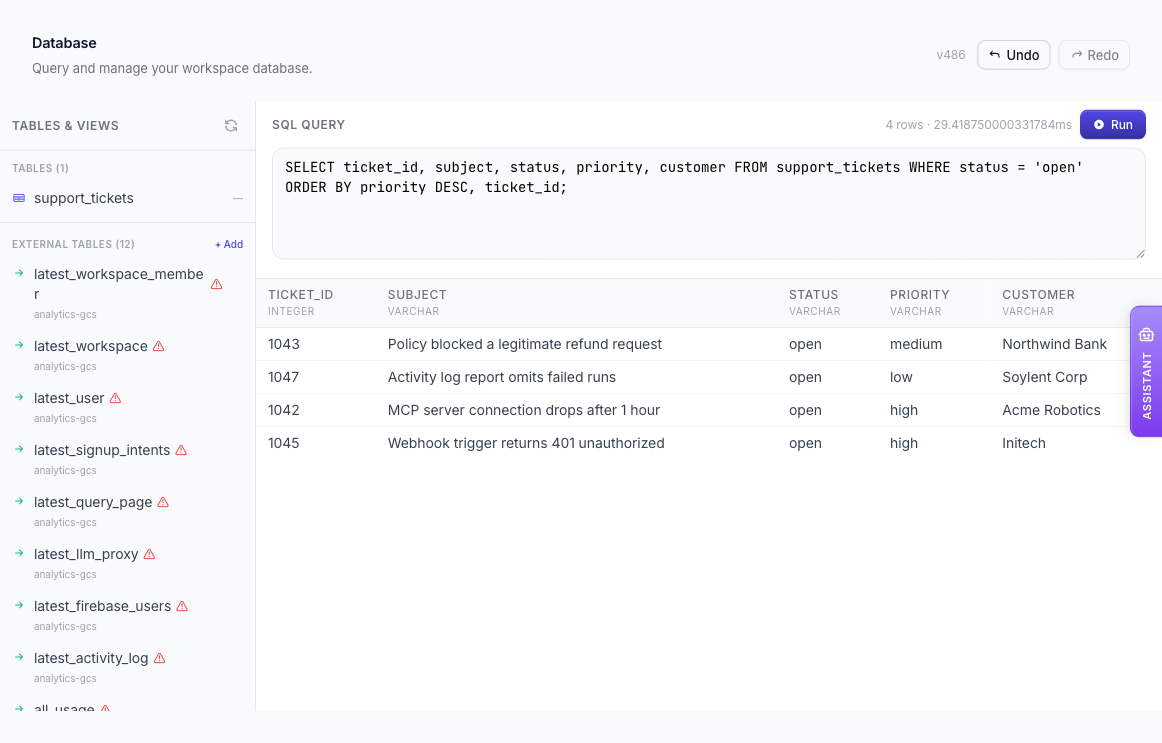
Open the Database page in any workspace and you get a full SQL surface: browse tables and views, run queries, create tables, and manage the schema. It speaks the SQL you already know — CREATE TABLE, INSERT, SELECT, CREATE VIEW, joins, aggregates, the lot.
It is built for analytical and agent workloads — working memory, extracted data, the results of a run — rather than as a transactional system of record. Think of it as the structured counterpart to a workspace's files: a durable home for the data your agents produce and consume.
A new capability for your agents
The database is not just a page for humans to click around. Switch on the built-in Database tool category and any governed agent — or the Workspace Assistant — gains a new set of skills:
list_tablesanddescribe_table— discover what data exists and how it is shapedexecute_sql— run queries and statements directlyimport_data— turn the output of another tool into a queryable tablecreate_external_table— register remote data as a live view (more on that below)delete_table— drop tables that are no longer needed

That is what turns a stateless responder into something closer to a colleague. An agent can store what it extracts, query it on its next run, and build on its own past work instead of re-deriving it. And because these are ordinary ContextGate tools, every SQL statement an agent runs passes through the same policy checks, audit trail, and activity logging as any other tool call — you always see exactly what it did.
Safe to hand to an agent
Giving an agent write access to a database raises an obvious worry: what happens when it runs the wrong statement — a DELETE with no WHERE clause, a DROP TABLE on the wrong name?
Every workspace database is versioned. Each change creates a new snapshot, and the Database page has plain Undo and Redo controls to step back and forth through that history; agents can do the same through the list_snapshots and database_restore tools. A destructive operation stops being a disaster and becomes just a version you can walk back from — which makes handing real data to an agent a much easier decision.
Reach data wherever it lives
Not all of the data an agent needs belongs inside the workspace. With external tables, you can register a remote file or table — in S3, GCS, Azure Blob, R2, Postgres, MySQL, or SQLite — as a live view in the workspace database.
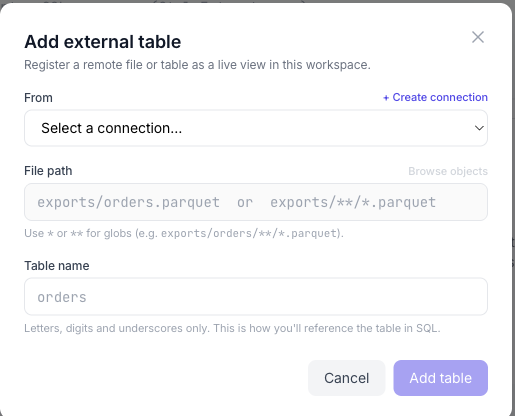
Once registered, an external table behaves like any other: the agent can query it with SQL, join it against tables it created itself, and feed the result into the next step. The data stays where it lives; your agent just gets a governed window onto it.
From rows to charts
Structured data is most useful when people can see it. Any query result can be turned into a bar, line, or pie chart, saved as a PNG, and dropped inline into a chat or embedded in a workspace document — so an agent can take a question all the way from raw rows to a shareable picture without leaving the workspace.
Built on DuckDB
The workspace database is powered by DuckDB, the fast, in-process analytical SQL engine. DuckDB is what makes a full database practical to embed in every workspace at once: it is lightweight, needs no server to administer, and is genuinely quick on the analytical queries agents tend to run. The version history behind Undo and Redo comes from DuckDB's DuckLake catalog layer, which gives each workspace database time-travel snapshots for free.
The result is a capability you do not have to think about — a real database, in every workspace, ready for your agents to use.
Try it
If you are building agents that should get smarter the more they run — accumulating knowledge instead of forgetting it — this is the foundation. Open the Database page in your ContextGate workspace and run your first query, or switch on the Database tool category for an agent and watch it do the same.