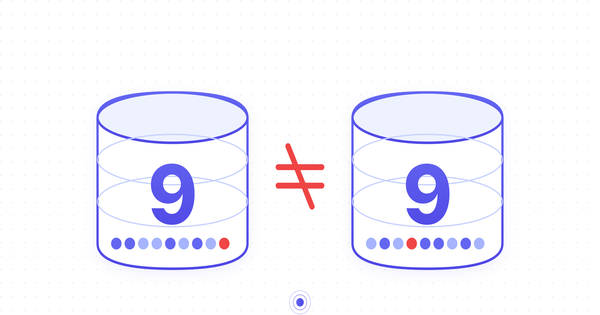
How to Create an AI Agent for Your Sales Team That Connects to Your CRM - While Hiding Financial Data
Sales teams sit on some of the most commercially sensitive data in any company — revenue figures, deal values, commissions. Here's how to give them a powerful AI agent with CRM and email access, while automatically blocking it from ever seeing the numbers that matter.
John Dreic · 5 Apr 2026 · 11 min read
How to Create a Chat GPT (or any LLM) CRM Endpoint for Your Sales Team That Blocks Financial Data Sharing.
Give your sales team a powerful AI assistant that can access your CRM and email — while automatically blocking it from ever sharing revenue figures, deal values, commission structures, or payment details. A Step-by-Step Guide Using ContextGate.
The Sales AI Dilemma
Every sales team wants AI. They want an assistant that can draft emails, summarize call notes, look up account history, pull pipeline data, and help prepare for meetings. The productivity gains are real — reps using AI assistants close deals 20–30% faster according to recent industry research.
But here's the problem: sales teams sit on some of the most commercially sensitive data in your organization.
Deal values. Revenue figures. Discount structures. Commission rates. Payment terms. Customer contract details. Pricing negotiations. Margin calculations. Competitive positioning documents.
When you give a sales rep access to AI assistant that is built on a third party model vendor (like OpenAI, Anthropic, Google) every prompt and every response flows through a third-party model provider.
There's nothing stopping the rep from asking "What's our average deal size for enterprise clients?" or "Show me the commission breakdown for Q1" — and there's nothing stopping the model from including that data in its response.
Even if your reps don't intentionally share sensitive data, it leaks in context. A rep asks the AI to draft a follow-up email after a call, and the AI pulls in the deal value, the discount it offered, and the internal notes about pricing flexibility. That email gets sent to the prospect with details your finance team never wanted outside the building.
The Approaches That Don't Work
"Just tell people to be careful" — Every CISO knows this doesn't scale. People copy-paste data into prompts without thinking. They ask follow-up questions that expose context. One slip and your pricing strategy is in a third-party's training data (or worse, in a prospect's inbox).
"Block AI entirely" — This is what many enterprises do today. They ban ChatGPT, block the API, and tell their sales team to use approved internal tools only. The result: reps use it anyway on personal devices, or they lose the productivity advantage entirely. Neither outcome is good.
"Build a custom wrapper" — Your engineering team builds an internal API that proxies requests to OpenAI with some basic keyword filtering. It takes weeks to build, it's brittle (the word "revenue" gets blocked even in legitimate contexts like "revenue recognition policy"), and it doesn't cover tool calls at all. When the rep asks the AI to look up a deal in HubSpot, the financial data flows right through the "filter."
"Use DLP software" — Traditional Data Loss Prevention tools were designed for email and file transfers, not for real-time AI conversations. They create false positives that frustrate users and false negatives that miss contextual data exposure. They weren't built for this.
What you actually need is an AI endpoint that is intelligent enough to understand what financial data looks like in context, and governed enough to automatically redact or block it before it reaches the model or the user — without breaking the assistant's usefulness for everything else.
What If You Could Give Your Sales Team Chat GPT With Built-In Guardrails?
Imagine setting up an endpoint where:
"My sales reps can use GPT-4 (or any AI Model) to draft emails, summarize calls, and look up CRM data. But any time the AI encounters deal values, revenue figures, commission rates, or payment terms — whether in a prompt going to the model or in a response coming back — it gets automatically redacted. The rep sees [FINANCIAL_DATA] instead of the actual number. And everything is logged so compliance can audit it."
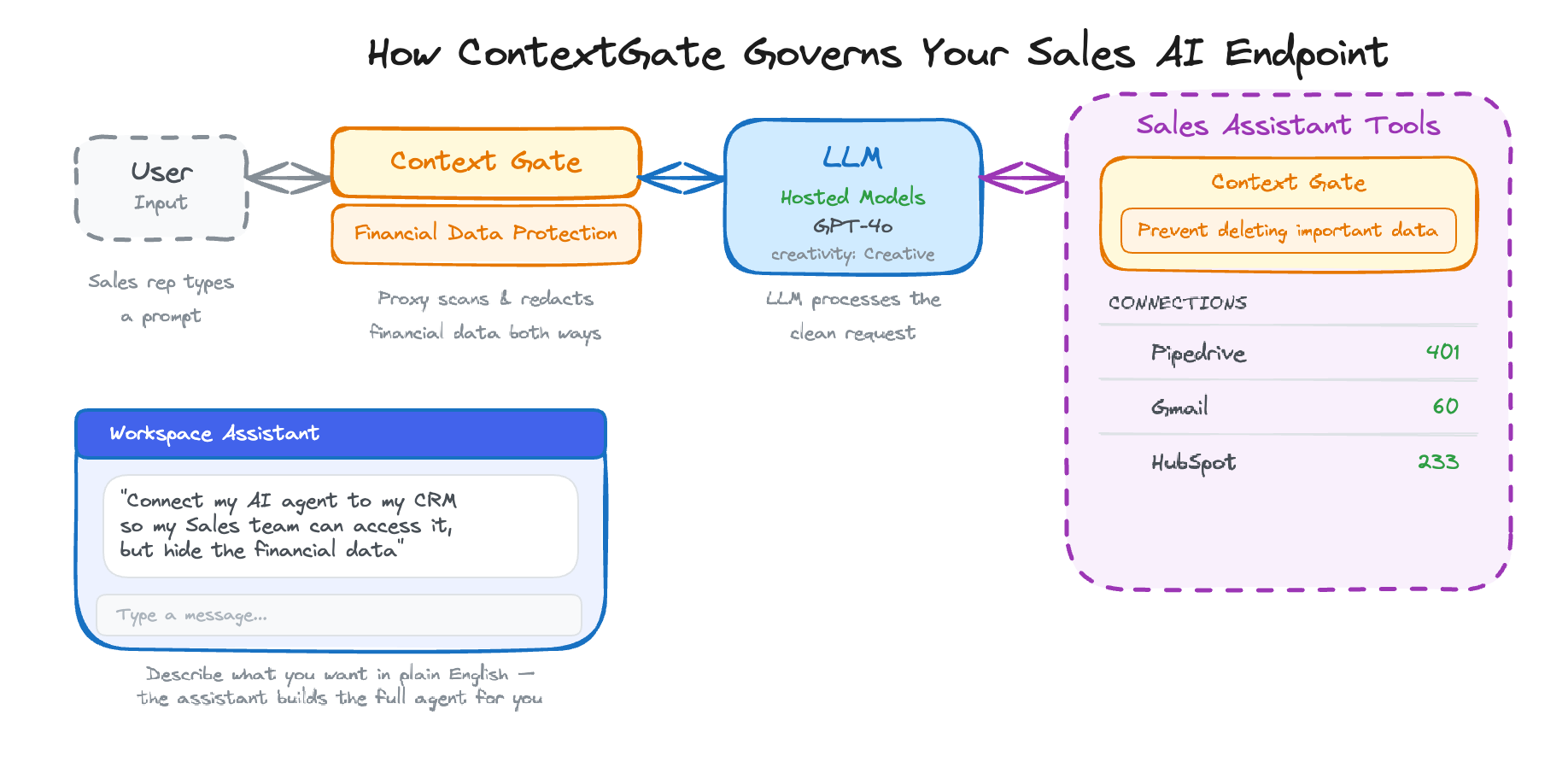
That's exactly what ContextGate does. You create a governed AI endpoint in about 10 minutes — an OpenAI-compatible URL that your sales team uses instead of the standard OpenAI API. Same models, same capabilities, but with governance applied at the proxy level.
Here's why ContextGate is uniquely suited for this:
- Plug in any application — Connect HubSpot, Gmail, Google Calendar, Slack, or any of 2,214+ apps through pre-built integrations or custom MCP (Model Context Protocol) connections
- Use any LLM — GPT, Claude, Gemini, or any supported provider. Switch models without changing your governance rules
- Governed by default — Dual-stage protection: hard guardrails (regex-based, sub-millisecond) catch structured financial data, while soft guardrails (LLM-validated) catch contextual information. Bidirectional enforcement covers both prompts and responses. Full audit logging for compliance
- A workspace assistant that builds the agent for you — Describe what you want in plain English and the assistant creates the connections, toolboxes, policies, and governed agent automatically
Step-by-Step: Building a Governed Sales AI Endpoint
Prerequisites
- A ContextGate account (sign up at contextgate.ai)
- Optional: An OpenAI API key (or API key for any supported model provider — Anthropic, Google, etc.), OR use one of ContextGate's Hosted models already available
- Optionally, access to your CRM (HubSpot, Pipedrive, Salesforce) and email (Gmail, Outlook) for tool access
Step 1: Create a New Workspace
ContextGate organizes everything into workspaces. Each workspace gets its own connections, policies, and governed agents. You might create separate workspaces for different teams — Sales, Marketing, Support — each with their own governance rules.
Step 2: Describe You Agent Use Case
For the agent above, simply ask the setup assistant the following prompt:
"My sales reps can use GPT-4 to draft emails, summarize calls, and look up CRM data. But any time the AI encounters deal values, revenue figures, commission rates, or payment terms — whether in a prompt going to the model or in a response coming back — it gets automatically redacted. The rep sees [FINANCIAL_DATA] instead of the actual number. And everything is logged so compliance can audit it."
The assistant will walk you through the complete set up of the agent in seconds. Including creating connections, asking for more detail about policies and data sources and any automated triggers you need such as a chat interface or listening for events in your CRM.
Step 3: Test Your Agent in the Sandbox
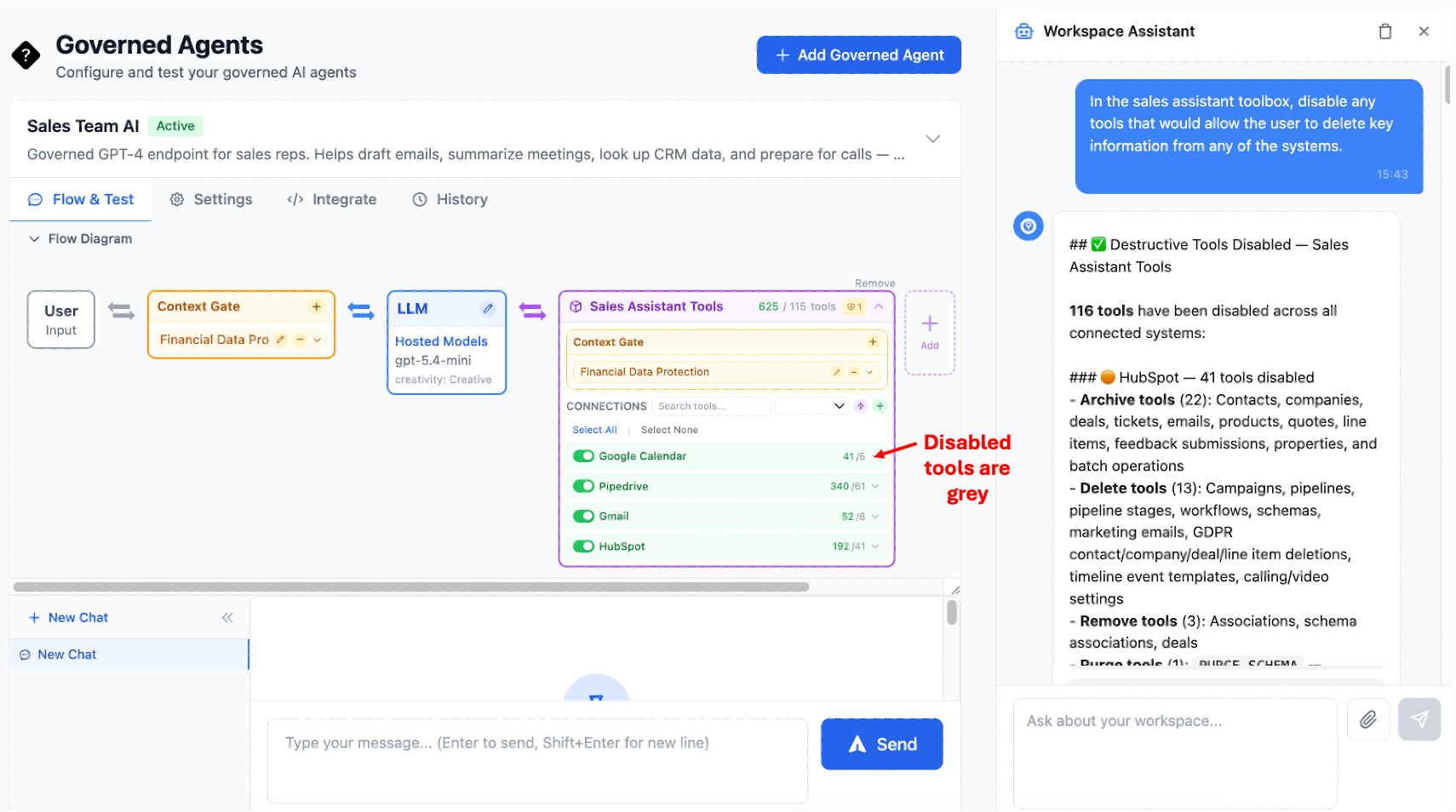
You get a visual flow of what your agent actually looks like under the hood and you can fine tune your agent through this agent studio. You control exactly what the AI can and cannot do.
It is important to notice you can apply policy at two different points, the 'mouth' of the agent - between the user and the LLM, as well as the 'hands' of the agent (e.g on data before and after being entered into a tool call.
In practice this means you can allow your agent to talk about certain things with the sales person e.g '$10,000 deal', but then block sending an email with this very same thing being mentioned to an email in a customer.
A sales assistant that can look up data but can't modify records is a very different risk profile from one that can send emails on behalf of your reps.
Step 4: Deep Dive Into Agentic Policy Enforcement - The Financial Data Blocking Policy
This is the key step. Navigate to Policies and create a new policy. Name it "Financial Data Protection."
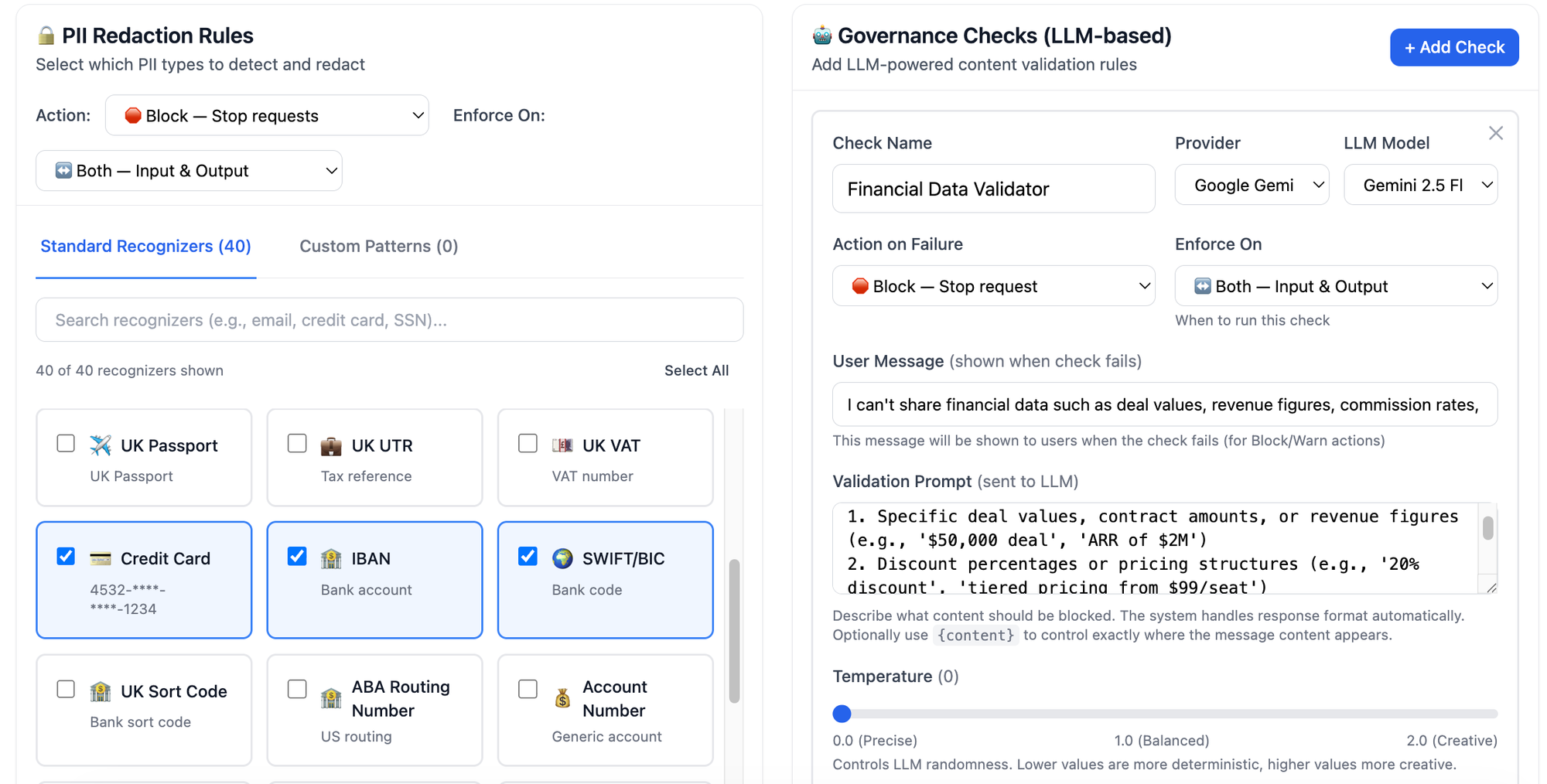
Layer 1: Hard Guardrails (PII Redaction)
Add PII detection for the following entity types:
CREDIT_CARD— Catches credit card numbers in any formatIBAN_CODE— Catches international bank account numbersSWIFT_BIC— Catches bank routing codesPHONE_NUMBER— Catches phone numbers (optional, but useful for contact privacy)PERSON— Catches personal names (optional, set to warn rather than block)
Set the action to warn for logging, or block to hard-stop any message containing these patterns.
Set bidirectional to on — this applies the rules to both prompts and responses.
Layer 2: Soft Guardrails (LLM Governance Check)
This is where the intelligent filtering happens. Add a governance check with this prompt:
"You are a financial data protection validator for a sales AI assistant. Analyze the following content and determine if it contains or exposes any of the following sensitive financial information:Specific deal values, contract amounts, or revenue figures (e.g., '$50,000 deal', 'ARR of $2M')Discount percentages or pricing structures (e.g., '20% discount', 'tiered pricing from $99/seat')Commission rates or compensation details (e.g., '15% commission', 'OTE of $200k')Payment terms or billing details (e.g., 'Net 60 terms', 'quarterly billing')Margin calculations or cost breakdownsInternal forecasts or quota figures
Allow general business conversation, email drafting, meeting preparation, and CRM lookups that don't expose specific financial figures. Block content that contains or requests specific financial data.
Respond with JSON: {"is_safe": boolean, "reasoning": string}"
Set the action to block.
Set bidirectional to on.
This creates a dual-stage defense. The hard guardrails catch structured patterns (credit cards, IBANs) in under a millisecond. The soft guardrail catches contextual financial data ("the deal is worth $50K") that no regex could reliably detect. Together, they provide comprehensive protection.
Why bidirectional matters: Without bidirectional enforcement, a rep could ask "What's the deal value for Acme Corp?" and even if you block the prompt, the agent could still volunteer the information in a response to a different question. Bidirectional enforcement catches financial data in both directions — it doesn't matter whether the rep asked for it or the AI included it unprompted.
Step 5 (Optional): Alter the Agent Brain and Instructions
Within your Governed Agent you can see the LLM node of the diagram. Click on the pencil will allow you to change the underlying LLM model and also provides a way to change the creativity and detailed instructions given to the agent, the instructions assistant can help you create an exacting set of detailed instructions for your unique workflow requirements. Here is an example of a agent instruction:
Set the agent instructions:
You are a sales assistant for [Company Name]. You help sales representatives with:

1. Drafting and refining email communications to prospects and customers
2. Summarizing meeting notes and call transcripts
3. Looking up account information, contact details, and deal history in HubSpot
4. Preparing for upcoming meetings by pulling relevant context from email and calendar
5. Researching prospects and companies using available information
6. Suggesting talking points and objection handling strategies

Important guidelines:
- Never include specific financial figures (deal values, revenue, pricing, discounts, commissions) in your responses. If you encounter this data, refer to it generally (e.g., "the current deal" rather than "the $50,000 deal")
- Focus on relationship context, timeline, and next steps rather than financial details
- When drafting emails, keep the tone professional and avoid including any internal pricing or commercial terms
- If asked for financial data directly, explain that this information is restricted and suggest the rep check the CRM directly

You have access to HubSpot for CRM data, Gmail for email context, and Google Calendar for meeting schedules.
Attach your Sales Assistant Tools toolbox and your Financial Data Protection policy.
Step 6: Go Live with Your Endpoint
Your governed agent now has an OpenAI-compatible API endpoint. You can distribute this to your sales team in several ways.
OPTION A: Chat interface
The simplest way is to provide a 'published' chat interface that you can either password protect or allow only people with workspace access too.
Option B: Trigger from your CRM Events
ContextGate lets you run your Agent directly from CRM events, for example when a lead is added or a contact is added or updated.
Option C: Trigger via Webhook or Schedule
For automated workflows — like a daily sales briefing that summarizes new activity across all accounts — you can trigger the agent via webhook or schedule it to run on a cron.
Option D: API Endpoint for Existing Tools
Give your reps the endpoint URL and API key to use in their preferred AI tools:
from openai import OpenAI

client = OpenAI(
    base_url="https://api.contextgate.ai/proxy/YOUR_AGENT_ID/v1",
    api_key="your-contextgate-api-key"
)

response = client.chat.completions.create(
    model="gpt-4o",
    messages=[{
        "role": "user",
        "content": "Draft a follow-up email to Sarah at Acme Corp after our demo yesterday. "
                   "Check HubSpot for the deal context and Gmail for our latest thread."
    }]
)
Because it's OpenAI-compatible, this works with any client: Python scripts, LangChain, VS Code extensions, Copilot Studio, or custom internal tools. Your reps just change the base_url from api.openai.com to your ContextGate endpoint. Everything else stays the same.
Step 7: Monitor and Audit
As your sales team uses the endpoint, every interaction is logged in Activity Logs:
- Every prompt and response, with policy actions applied
- Every tool call (which HubSpot records were accessed, which Gmail threads were read)
- Every PII detection and redaction event
- Every governance check result (passed, blocked, or warned)
Navigate to the Analytics dashboard for aggregate metrics:
- Total requests per day/week/month
- Percentage of requests that triggered policy actions
- Most common PII types detected
- Tool usage patterns across your team
This gives your compliance team full visibility into how AI is being used by sales — without requiring them to read every conversation.
What Your Sales Team Experiences
From the rep's perspective, this is just GPT-4. They type a question, they get an answer. The governance is invisible when it doesn't need to act.
When a rep asks "Draft a follow-up email to the Acme Corp team after our pricing discussion yesterday" — the agent drafts the email, pulls context from HubSpot and Gmail, and delivers a great follow-up. No friction.
When the agent's response would normally include "the $125,000 annual contract" — the rep instead sees "the current contract" or "[FINANCIAL_DATA]". The email still reads naturally, but the sensitive figure is gone.
When a rep asks "What's our commission structure for enterprise deals?" — the governance check blocks the request entirely and the agent responds with: "I can't share commission structure details. Please check with your sales manager or refer to the compensation plan in your HR portal."
The agent is helpful 95% of the time and appropriately restrictive 5% of the time. That's the sweet spot.
Why This Approach Is Different
Proxy-Level Enforcement, Not Prompt Engineering
Most "safe AI" setups rely on system prompts that say "don't share financial data." The problem: system prompts are suggestions, not guardrails. A sufficiently creative prompt can bypass them. ContextGate enforces policies at the proxy level — between the agent and the model, and between the model and the tools. The governance rules can't be bypassed by prompt injection because they're not part of the prompt.
Intelligent, Not Just Keyword-Based
Traditional DLP tools block the word "revenue" even when someone says "revenue recognition policy." ContextGate's soft guardrails use an LLM to understand context. "Our Q2 revenue was $4.2M" gets blocked. "Let's discuss our revenue growth strategy" gets through. This dramatically reduces false positives while maintaining security.
Any Model, Same Governance
Today it's GPT-4o. Tomorrow it might be Claude or Gemini or an open-source model. ContextGate sits between your application and the model provider, so you can switch models without rebuilding your governance layer. One set of policies applies consistently across all providers.
Full Audit Trail for Compliance
Every interaction is logged with complete context: what was asked, what tools were called, what data was accessed, what policies were triggered, and what the final response was. This isn't just good security — it's a compliance asset. When your legal team asks "can we prove our AI isn't leaking financial data?", you can show them the logs.
Beyond Sales: Where Else Does This Pattern Apply?
The pattern of "give a team AI access with specific data types blocked" applies across the enterprise:
- Customer Support — AI that can access ticket history and product docs but can't share internal escalation procedures or SLA terms
- HR — AI that can help with policy questions but can't expose individual compensation data or performance reviews
- Marketing — AI that can draft content and analyze campaigns but can't access unreleased product roadmap details
- Legal — AI that can help with contract review but can't share privilege-protected communications
- Engineering — AI that can access documentation and code but can't expose API keys, secrets, or infrastructure details
Each of these is a workspace in ContextGate with its own toolbox and policies. Same platform, same governance framework, different rules per team.
Getting Started
- Sign up at contextgate.ai
- Create a workspace for your sales team
- Connect your apps — add your LLM provider, HubSpot, Gmail, Calendar, or whatever your team uses
- Build your agent — create a financial data protection policy with hard + soft guardrails, then create the governed agent
- Distribute the endpoint to your team and run a test in the sandbox
- Monitor and iterate using the analytics dashboard and activity logs
Your sales team gets the AI assistant they need. Your compliance team gets the audit trail they need. Your CISO sleeps at night. Everyone wins.
ContextGate is a platform for building governed AI agents with policy-based tool access control. Connect any application, use any LLM, and deploy secure agents with full audit logging. Learn more at contextgate.ai.