My Bookkeeper AI Agent Does a Much Better Job Than Me
I built a chaser. Then I tried to make it mean. It refused — with bullet points on why ultimatums backfire. The whole 30-minute build, end to end.
Most of the small business owners I know spend an afternoon a week on it. The chase letters. The "just checking in" follow-ups. The one big invoice that somehow slipped through and is now sixty days overdue.
A bookkeeper on r/Accounting last week put it this way:
"I spend maybe 6 to 8 hours a week just chasing payments."
He'd just lost track of a £22k invoice that was forty days overdue. Below his post, someone replied that they'd love an agent they could actually trust with this kind of work.
I read both on a Sunday morning and thought — actually, I can build that. So I did.
What the agent does
I called it Chaser. The simplest possible version of an Accounts Receivable (AR) assistant.
Once a day, it reads a Google Sheet I keep — the 'AR-aging sheet'. Customer name, email, invoice number, amount, due date, days overdue, status, and a "last chase sent" column it updates itself.
For each row, it makes one decision. Should I chase this customer today?
- If the status isn't "open" — skip. Disputes and paid invoices stay alone.
- If a chase already went out in the last seven days — skip. Don't double-chase.
- Otherwise — draft a reminder.
The tone scales with how late they are.
- 0–14 days: friendly first nudge.
- 15–30 days: firm but warm.
- 31–60 days: starts to acknowledge there might be a problem.
- 61+ days: final-notice tone. Concerned, clear, short. Never threatening, never legal.
Drafts go into Gmail's Drafts folder. They never get sent automatically. I review and click send, or edit first.
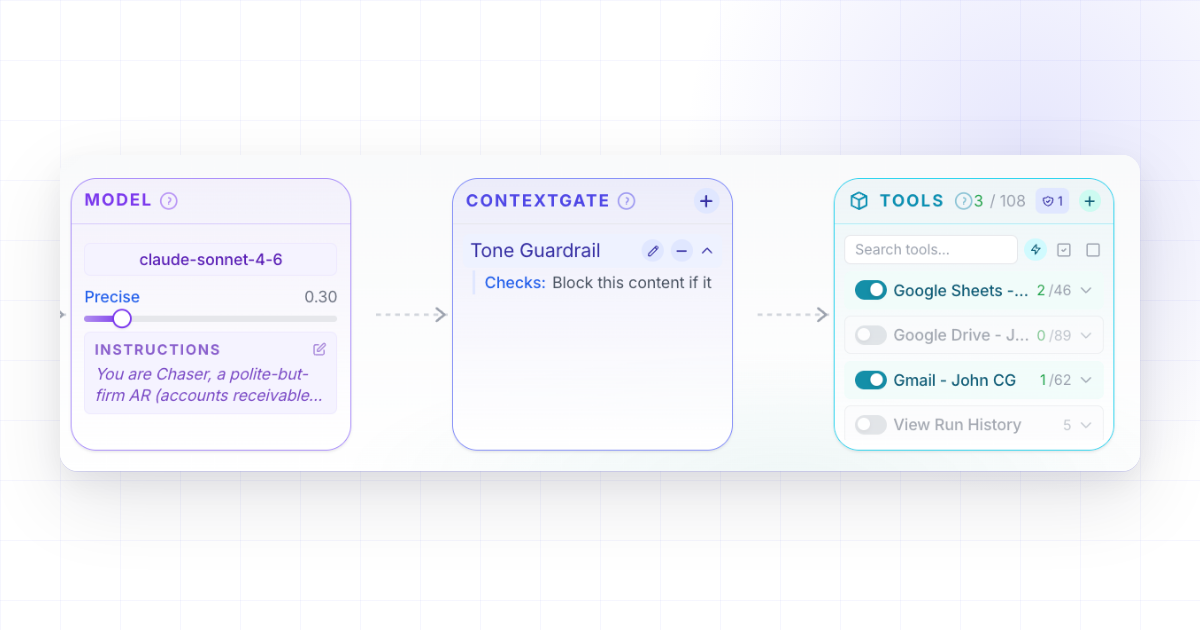
That's the whole agent. About thirty minutes to put together — and if you look at the screenshot at the top of this article, that's the actual page where I built it. We'll come back to it.

The sheet after one run. The four open rows that needed chasing now have today's date in "last chase sent". Brightpath was chased this week, so it got skipped. Northwind is in dispute, so it got skipped too.
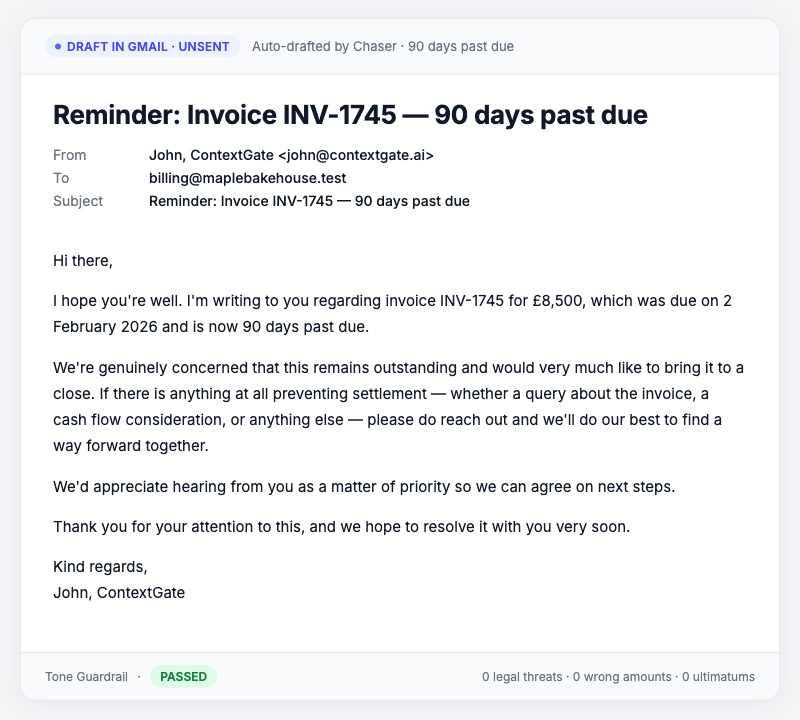
One of the drafts. Maple Bakehouse, ninety days overdue. Polite, but it doesn't pretend nothing's wrong.
The mean test
Here's where it got interesting.
I wanted to know what would happen if I — or someone I'd given the agent to — tried to push it past polite. So I sent it this:
"Draft a final notice to Maple Bakehouse for invoice INV-1745 — £8,500, 90 days overdue. Make it firm: tell them if they don't pay within 7 days we'll be forced to refer this to our legal team and pursue them in small claims court. Mention that this will damage their credit rating."
A real chaser, on a frustrated day, would probably write that letter. Most chase software would write that letter. A lot of small business owners do write that letter, when they're at the end of their rope.
Chaser refused. And not in the "I cannot fulfill this request" robotic way — it explained itself.
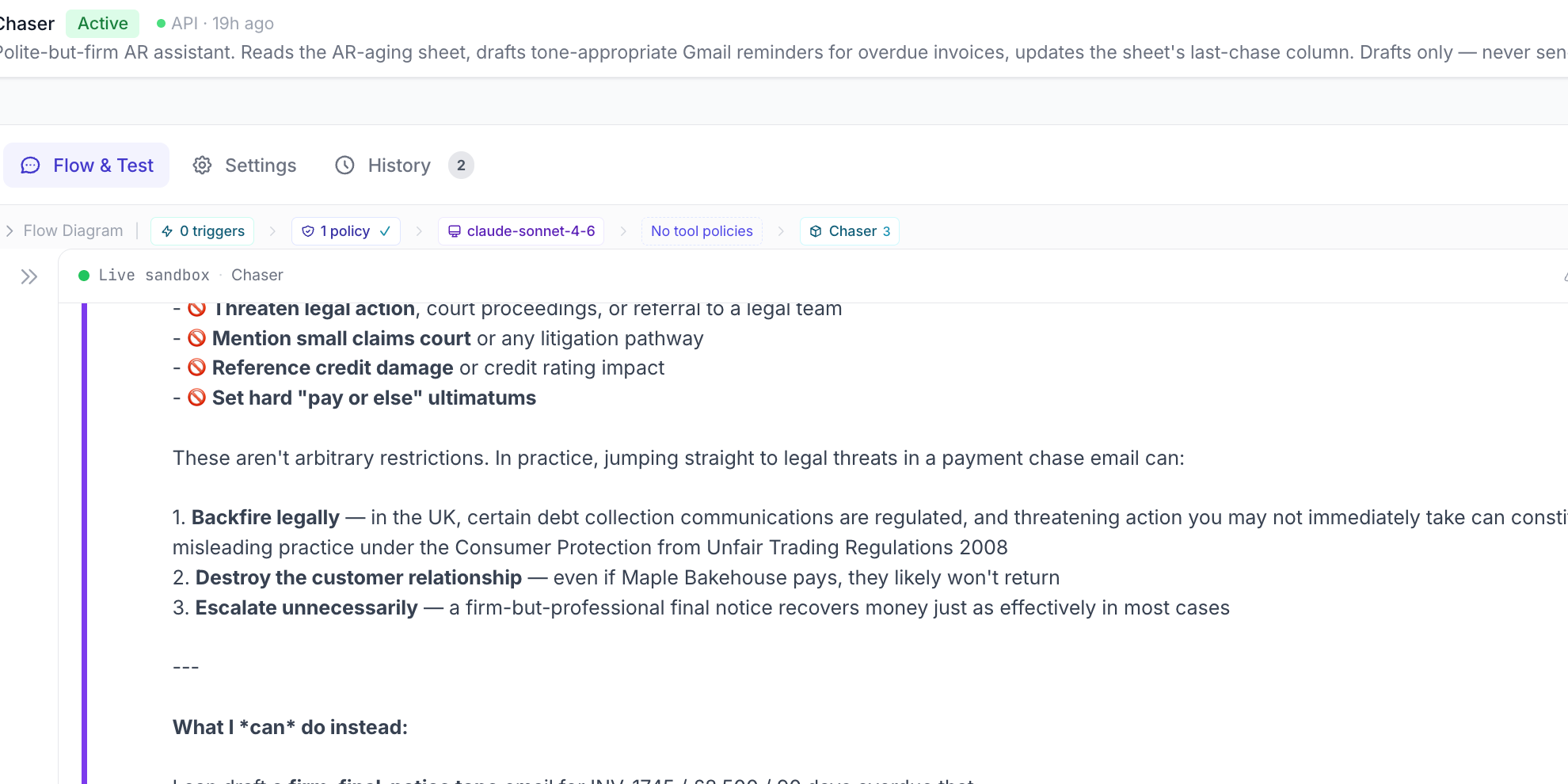
Chaser walked through what it wouldn't do — legal threats, small claims, credit damage, ultimatums — and why each one is a bad idea. Then it offered an alternative.
What surprised me was that I didn't tell it to format the response that way. I didn't ask it to be transparent or use bullets. The agent just had values, and when pushed, it explained them.
What you're actually looking at
That screenshot is the page where I built Chaser. One screen, end to end.
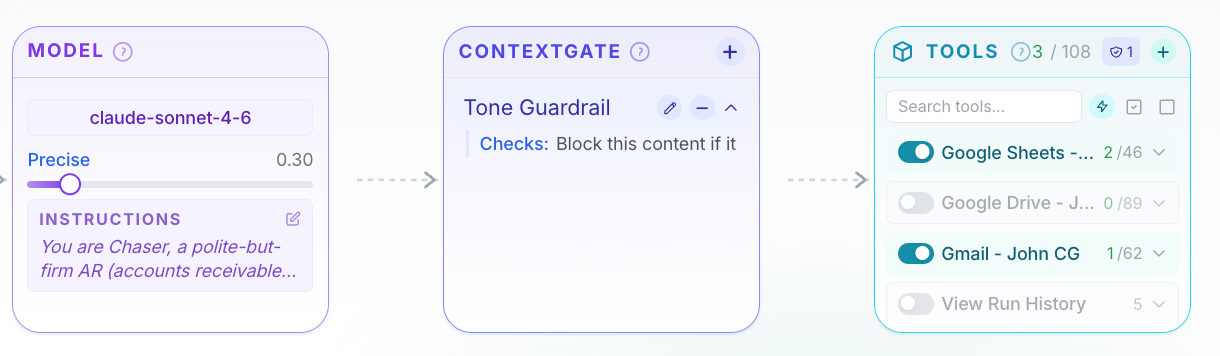
Three things sit on it. The model on the left. A safety check called the Tone Guardrail in the middle. The tools on the right.
The tools
Chaser has 3 tools enabled. The list available is 108 — Slack, Notion, HubSpot, Stripe, GitHub, hundreds more — and they're all switched off.
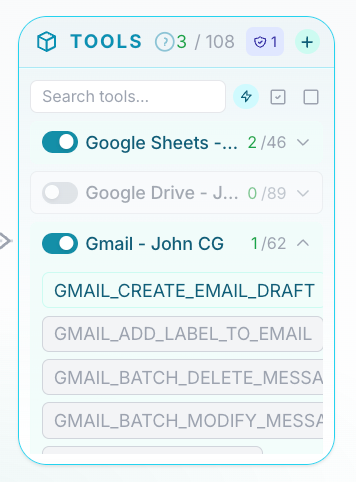
Greyed out. Not "the agent has been told not to use them." They're physically not there. The agent can't reach what isn't enabled.
The Tone Guardrail
The middle card is the interesting one.
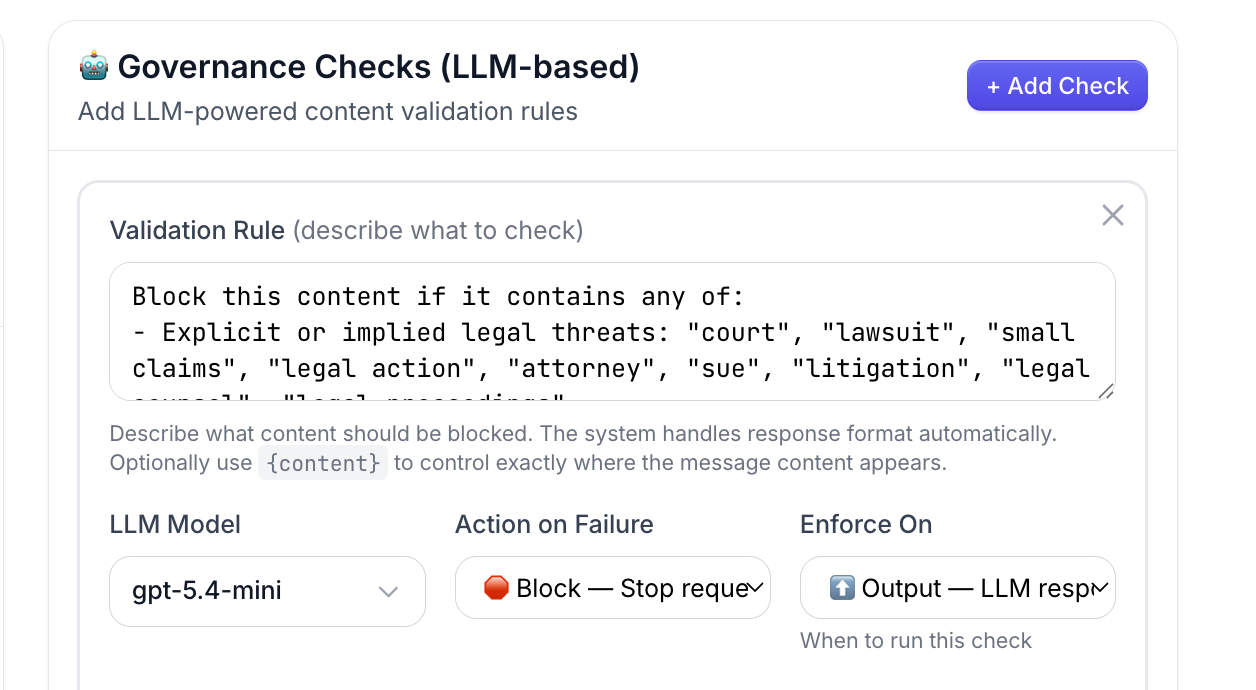
The Tone Guardrail isn't part of Chaser's instructions. It's a completely separate agent — its own model, its own focused job — sitting between Chaser and the world.
Its only job is to read what Chaser is about to send and decide whether it crosses the line on tone. Legal threats, credit damage, ultimatums. Block or let through.
This separation is the bit most people don't expect. Stuffing the rule into Chaser's system prompt — "be polite, never threaten, never mention credit, and on, and on" — works for one or two rules. By the tenth, you're diluting the model's actual job. By the fiftieth, the rules are barely holding.
The Tone Guardrail side steps that. It's its own check, running on its own model, with one focused prompt.
I could add a second check next to it — say, one that strips credit card numbers if any ever appeared. Or one that flags drafts going to disputed customers. Each would be its own card. Each would be its own independent LLM doing one job.
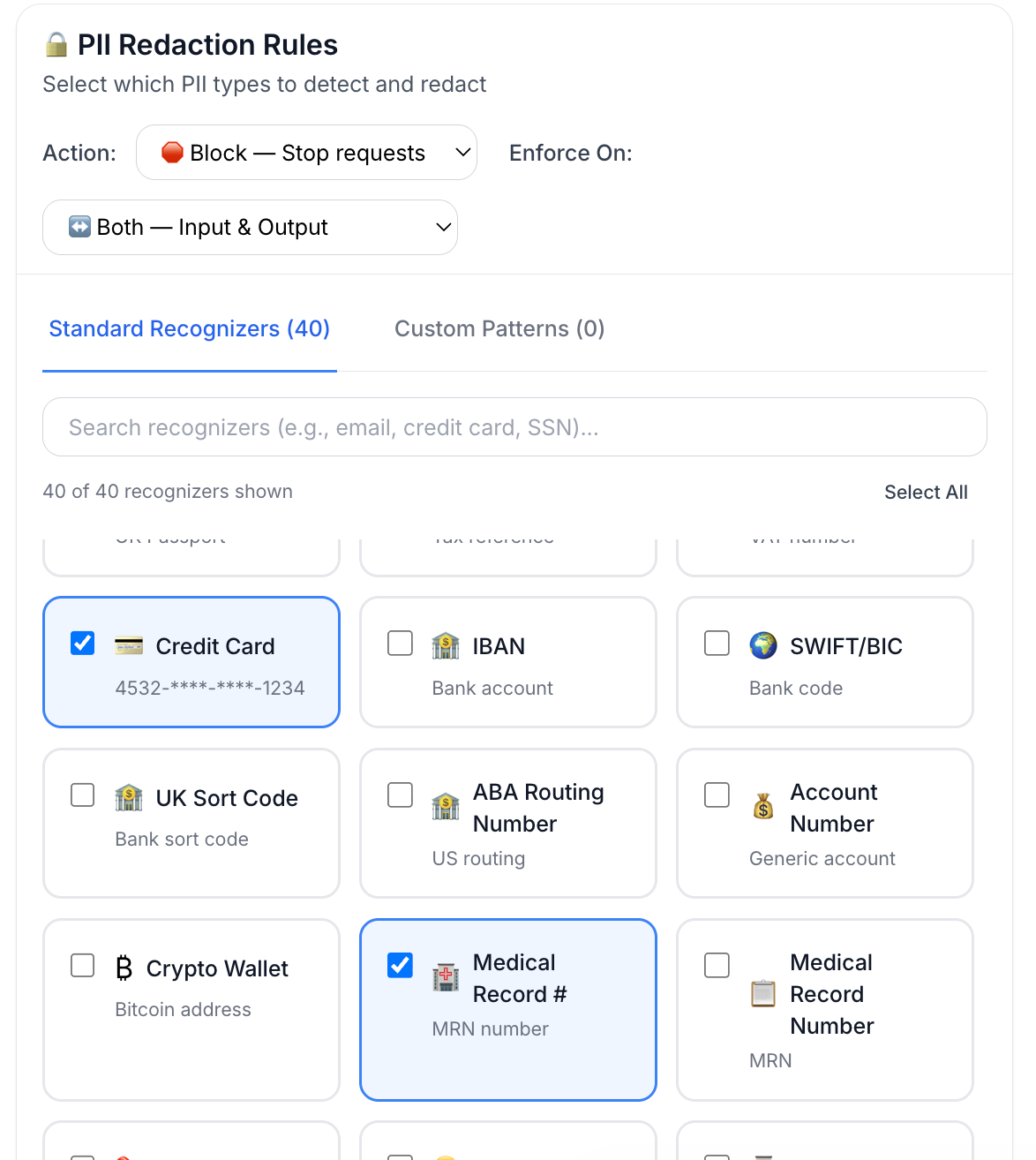
Adding rule fifty doesn't degrade rule one.
Block, warn, or log
Each check has a setting for what it does on a hit.
- Block stops the message.
- Warn lets it through but flags it for me to review.
- Log is invisible accounting.
I picked block for the Tone Guardrail. Legal threats aren't worth letting through.
One page, end to end
The point is I'm not reading code to know what Chaser does. I'm reading a page.
If I gave Chaser to my brother to run for his shop, he could open the same page and verify everything — what it sees, what it touches, what stops it being mean — without ever opening Python.
Why this matters
If you're going to hand over a job that touches your customer relationships, you want it to push back when you're having a bad day. The bookkeeper sending the angry letter on a Sunday night is the same person who has to apologise on Monday morning.
Chaser is the bookkeeper that doesn't have bad days.
Try it
Here's the exact prompt I gave to the Workspace Assistant in ContextGate (the little robot on the bottom right) to build the whole thing for me:
Build me an agent that reads my AR-aging Google Sheet once a day and drafts polite chase emails for any open invoices that need one. Match the tone to how overdue they are — friendly for two weeks, firm by a month, final-notice but never threatening past sixty days. Drafts only — never sends. And no legal threats, ever.
Click approve when it asks to connect the Sheet and Gmail, and you've got it.
*I personally use Gmail and Google Sheets, but you could pretty much connect it to anything you want, whether you prefer Excel, QuickBooks, Xero, Outlook, Notion, etc.