Introducing investigative policy checks: governance that looks things up before it decides
A governance check that only sees the words of a message is guessing. ContextGate policy checks can now run on a model you choose — and call read-only tools to ground the decision on live workspace data.
Consider a governance check with one job: block any request that asks an agent to approve a refund larger than the customer is worth. Now give it only the text of the message — “approve a $5,000 refund for this customer.”
It cannot do the job. Five thousand dollars might be trivial for one customer and absurd for another, and the message does not say which. A text-only check has to guess. And a governance check that guesses is not really governance.
This release fixes that at the root. A ContextGate policy check is no longer a single prompt staring at a string. It is a small, governed investigator — one you point at a model of your choosing and, when it helps, let call read-only tools to ground its decision on live data.
Write the rule in plain language
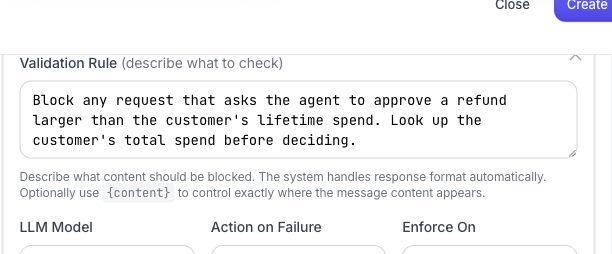
A governance check still starts the easy way: describe, in plain English, what should be blocked. No DSL, no regex. The example below is the refund rule — and notice the last sentence, which tells the check to go and look something up.
Pick the model that runs the check
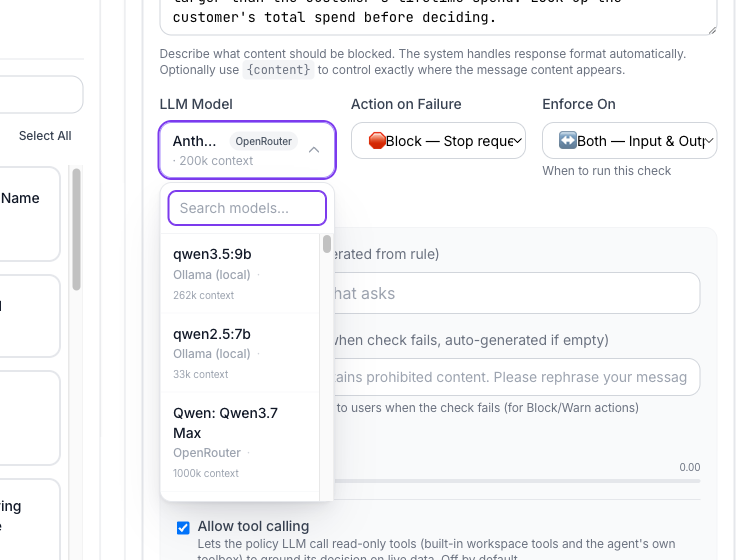
The check itself runs on an LLM — and which LLM is now your call. Every model in the workspace is available, whether it is a local Ollama model or one of the hundreds routed through OpenRouter.
That choice matters. A blunt keyword-style check can run on a small, cheap, fast model and add almost no latency. A subtle judgement call — “is this refund reasonable?” — can run on a frontier model. You are no longer stuck with one enforcement model for every rule in the workspace; you match the model to the difficulty of the decision.
Let the check call read-only tools
The real shift is under Advanced Settings: Allow tool calling. Turn it on and the policy LLM can call read-only tools — built-in workspace tools and the agent's own toolbox — to gather the facts it needs before it rules.
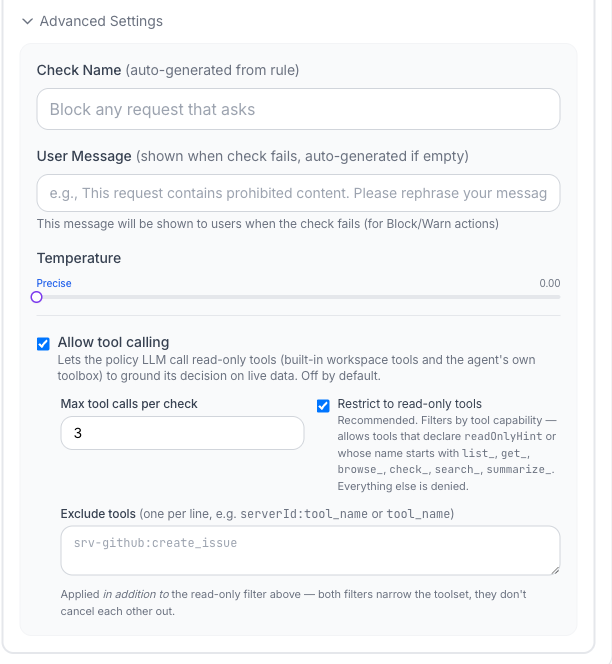
So the refund check no longer guesses. It looks up the customer's lifetime spend, compares it to the requested amount, and then decides. The decision is grounded in live data instead of the words of a single sentence.
Because this is governance, the power is deliberately bounded:
- Read-only by default. The Restrict to read-only tools filter allows tools that declare a read-only hint or whose names start with
list_,get_,browse_,check_,search_,summarize_— everything else is denied. A policy check can investigate; it can never act. - Capped. A max tool calls per check limit keeps a check from turning into an open-ended agent of its own.
- Narrowed. An explicit exclude list removes specific tools on top of the read-only filter.
Checks that investigate, not guess
This is the difference between a guardrail that pattern-matches and one that reasons. Your policy now runs on a model fit for the decision, and it can pull the data it needs to make that decision well — all inside the same enforcement engine, with the same audit trail, and a hard read-only boundary it cannot cross.
Open the Policies tab in any ContextGate workspace, add a governance check, and open its Advanced Settings. If you do not have a workspace yet, create a free one and give your first policy a model and a pair of eyes.