Introducing tool compression transparency: see exactly what your agent can do each turn
Connect enough tools and your agent's prompt quietly fills up — until tool results start getting trimmed mid-conversation. ContextGate now shows you the whole budget: strategy, savings, and tools loaded per turn.
Here is a failure mode that almost nobody sees coming. You connect a few rich MCP integrations to an agent — GitHub, a CRM, a search provider — and each one brings dozens or hundreds of tools. Every tool has a schema, and every schema costs tokens. Before long, the agent's prompt baseline is enormous before the conversation has even started.
The symptom is subtle and nasty: as the conversation grows, there is no room left, so earlier tool results get silently trimmed. The agent does not announce it. It just quietly starts forgetting things it was told two turns ago.
ContextGate now makes that whole budget visible.
One popover, the whole picture
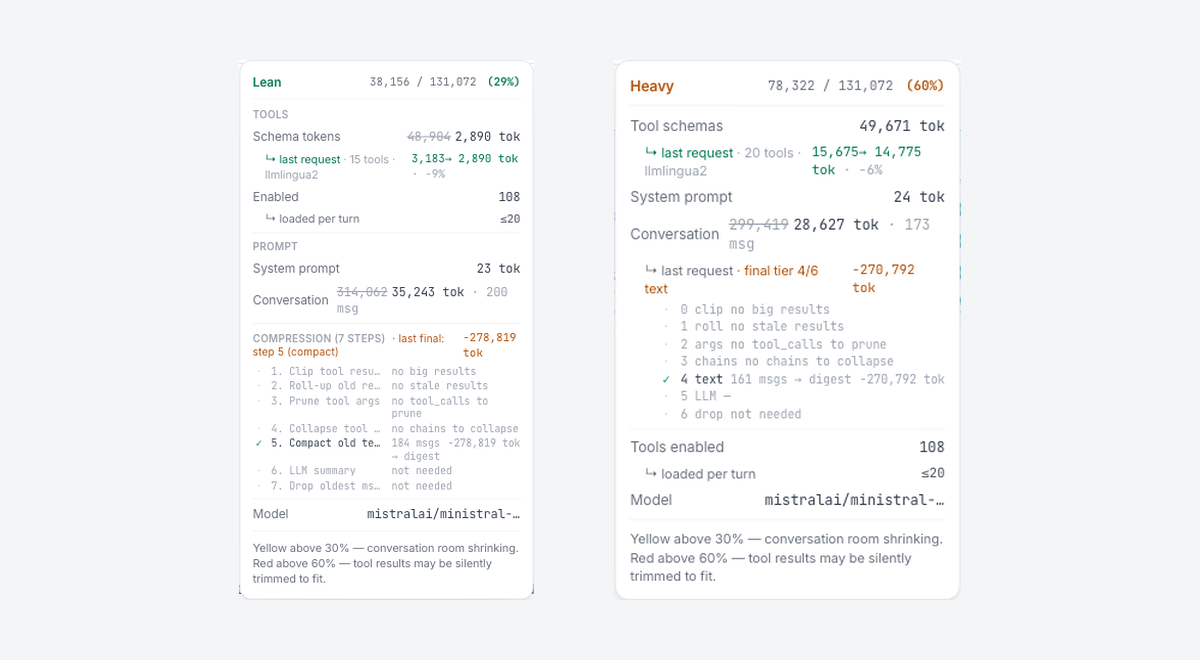
Every governed-agent chat has a small prompt-baseline indicator. Open it, and you get a complete breakdown of where the context window is going: schema tokens from your tools, the system prompt, the conversation so far, and — crucially — the compression that is keeping it all inside the limit.
The colour coding is the quick read. Below 30% you are comfortable. Yellow above 30% means conversation room is shrinking. Red above 60% is the warning that matters: tool results may be silently trimmed to fit. For the first time, the thing that used to fail invisibly has a number and a colour.
Compression you can audit
ContextGate does not just measure the problem — it manages it, through a multi-step compression strategy. And the popover shows you every step: which strategies ran, which were skipped, and how many tokens each one saved.
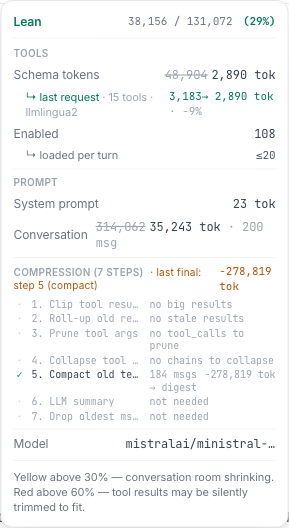
Clip oversized tool results, roll up stale ones, prune unused arguments, compact old text — each step is listed with its outcome. Compression stops being a black box and becomes something you can read line by line.
Ask the agent what it can actually do
Two related changes round this out. Tool counts are now accurate — what the popover reports matches what the system genuinely loads, including the fact that the agent loads only a focused subset of tools per turn, not all of them at once.
And there is a new read-only tool catalog: you — or the agent itself — can ask exactly how many tools it has access to and what they are. The system is also explicit that the available tools may change between turns, so neither you nor the model is working from a stale assumption.
No more silent context loss
Toolbox token bloat is one of the least obvious ways an agent degrades. It does not throw an error; it just gets quietly worse. ContextGate's answer is transparency: show the budget, show the compression, show the real tool count — and turn an invisible failure into something you can see, diagnose, and fix.
Open any governed-agent chat in ContextGate and click the prompt-baseline indicator. If you do not have a workspace yet, create a free one and connect a few tools to watch the budget fill.